
Binance account guide · 2026
How to Sign Up for Binance: A Step-by-Step Guide (2026)
A Binance account needs an email address or phone number, a 6-digit code and a password. This guide covers who Binance accepts, every sign-up screen on the website and in the app, the identity check that follows, and the security settings to switch on once you're in.
Last checked: October 22, 2026 · Screenshots captured October 2026 · About 14 min read
Binance's eligibility rules: age, residence and the prohibited countries list
Check your eligibility before you start the sign-up flow. Binance's published registration steps don't tell you whether you qualify for an account. Binance's Terms of Use (the version in force from 21 July 2026) and its List of Prohibited Countries (dated 5 January 2026) decide who can register. Here is what they say.
You must be an adult who can sign a contract
Individuals must be at least 18 years old and legally allowed to enter binding contracts where they live. Another clause in the same Terms phrases it as 18 or the age of majority in your country of residence, whichever is greater. If your country sets adulthood at 19 or 21, that higher age is the one that counts.
US residents and US citizens are both excluded
The United States sits in a tier of its own. Binance's wording covers anyone located in, resident of, a citizen of, or operating in the US. Because citizenship is included, a US citizen living abroad is still covered by the restriction. Binance.US is a separate platform, and this guide doesn't cover it.
Other countries and regions on the list
For every other entry, the test is where you are located, resident or established, not which passport you hold.
- Located, resident, citizen of, or operating in
- United States
- Located, resident, incorporated or otherwise established in
- Canada, the Netherlands, Cuba, North Korea, Iran, Crimea, the so-called Donetsk People's Republic, the so-called Luhansk People's Republic
The Terms add two broader exclusions. You can't register if you are a "Restricted Person", which covers people named on UN, EU, US or other sanctions lists. And you can't register from anywhere it would be illegal under local law for you to use Binance, whether or not that place appears on the list. Binance can also update the list without prior notice, so open the current List of Prohibited Countries if you're reading this long after the date above.
The UK: not on the list, but check first
The United Kingdom isn't on the prohibited list, and that alone doesn't mean you can sign up from there. In a blog post dated 16 October 2023, Binance said it would stop accepting new UK users from 5pm UK time that day. It described the restriction as temporary, lasting until it brought in a new FCA-authorised firm to approve its UK financial promotions. Confirm Binance's current position for the UK before you start.
Places with their own Binance entity
Binance's licenses page lists locally registered or licensed entities in a number of countries, among them Binance Japan, Binance Australia (InvestbyBit Pty Ltd), Tokocrypto in Indonesia and Gulf Binance in Thailand. If you live in one of those countries, look up which entity covers you before following a walkthrough of the global Binance.com flow like this one.
This guide is not intended for readers in jurisdictions where crypto services are prohibited, including mainland China.
Don't work around a restriction. The Terms say you must not try to circumvent location restrictions, "including by use of any virtual private network to modify your internet protocol address". They also let Binance restrict or close accounts where the information provided is wrong or outdated, where more than one person uses the same account, or where someone opens multiple accounts without Binance's written consent. Register with your own name, your own document and your real country of residence.
Binance also keeps the right to refuse any application without giving a reason, including when it can't verify your identity to its satisfaction. If you pass the checks above, the next part is the sign-up itself.
Email, phone, Google, Apple or Telegram: which sign-up method to use
On the website, Binance offers five ways to create a personal account. They all end with a working account, but the screens in between are different.
| Method | What happens after you pick it | Password step |
|---|---|---|
| Email address | A 6-digit code goes to your inbox. Enter it within 30 minutes, then set a password. | Yes |
| Phone number | Same as email, but the code goes to your phone. | Yes |
| Google or Apple | A pop-up asks you to sign in to Google or Apple. You confirm the Terms of Service and Privacy Policy, return to Binance and confirm once more. | Not part of the Help Center steps |
| Telegram | You click Connect, log in to Telegram and confirm in the notification Telegram sends you. Then you enter an email or phone number and the one-time code sent to it. | Not part of the Help Center steps |
Binance's own steps show where the methods differ. Google and Apple skip the code and password screens. Telegram adds a connect-and-confirm round, then still asks for an email address or phone number and a one-time code. Phone sign-up relies on Binance's texts reaching you, and Binance says its SMS coverage doesn't extend to every country and region.
Personal or entity account
Everything below describes a personal account. Companies use a separate entity flow that starts from [Sign up for an entity account] and asks for the entity's name and an entity email address. Binance's Help Center is blunt about this choice: once registered, you cannot change the account type. Pick the one that matches who will actually own the account.
How to sign up for Binance on the website, step by step
Keep your inbox or phone within reach before you begin. The code arrives partway through, and it expires.
Step 1: Open binance.com and make sure it's genuine
Type the address yourself or use a bookmark. Avoid sign-up links that arrive in ads, direct messages or unexpected emails. If you're unsure whether a website, email address, phone number or social account really belongs to Binance, check it on Binance Verify: choose the type from the dropdown, paste what you want to check and click Search.
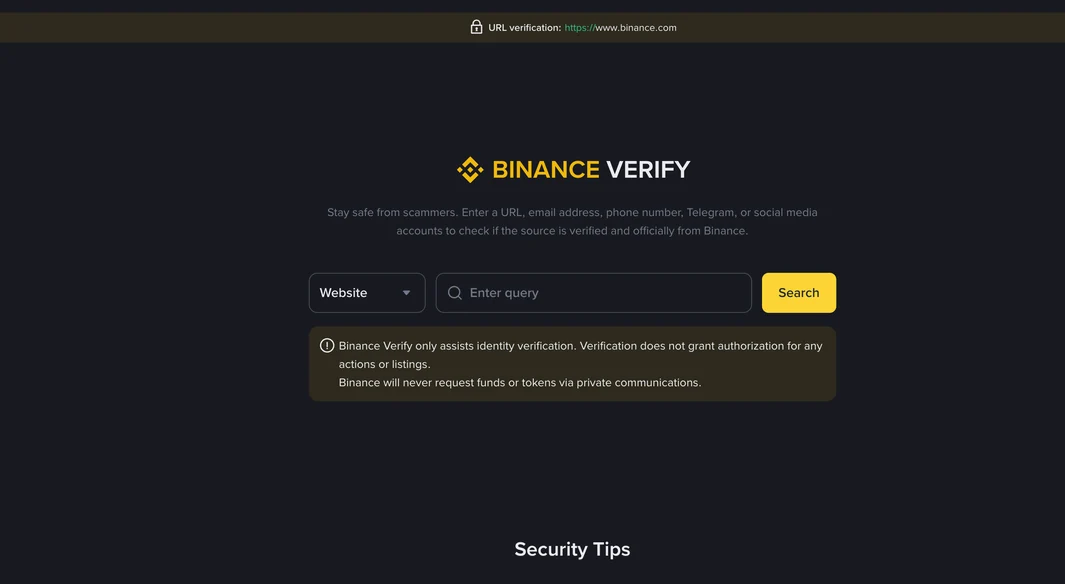
Read the notice under the search box too. Binance says the tool "only assists identity verification" and that a match "does not grant authorization for any actions or listings". The second line is the one to remember: "Binance will never request funds or tokens via private communications."
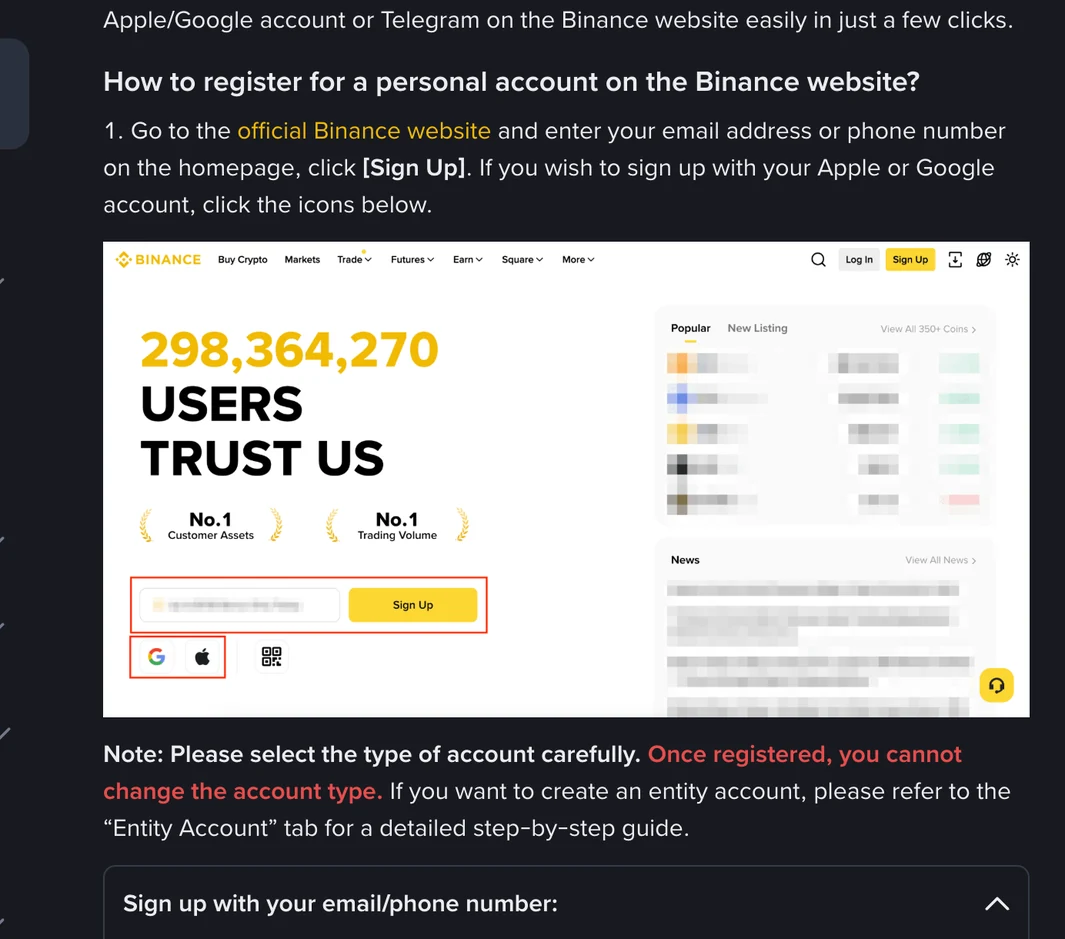
On the Binance homepage, enter your email address or phone number and click [Sign Up]. To use Google or Apple instead, click the icons under the field.
If you arrive through a referral link, you skip the homepage and land on a page headed "Welcome to Binance". It has one field labelled Email/Phone number, with the placeholder text "Email/Phone (without country code)", a checkbox about Binance's Privacy Notice, a yellow Register button, and Continue with Google, Apple and Telegram below.
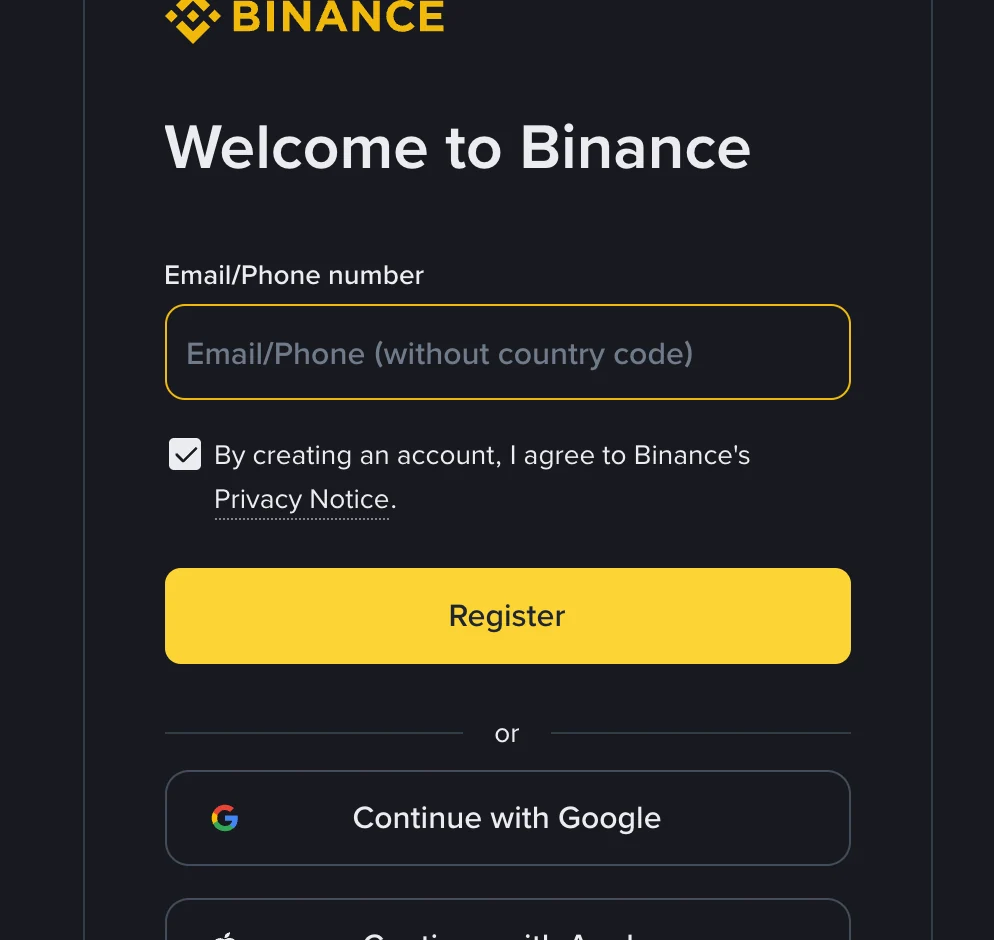
When entering a phone number here, follow the placeholder and leave out the country code.
Step 2: Agree to the terms and click Next
Coming from the homepage, your email address or phone number is filled in for you. Binance's Help Center tells you to read and agree to the Terms of Service and Privacy Policy, tick the box and click [Next]. The live form you see may word the checkbox a little differently, as the one above does with "Privacy Notice". Go by what your screen shows.
Step 3: Enter the 6-digit code within 30 minutes
Binance sends a 6-digit code to the email address or phone number you entered. The screen is headed Email Verification or Phone Verification and states that the code is valid for 30 minutes. Type it in and click [Submit].
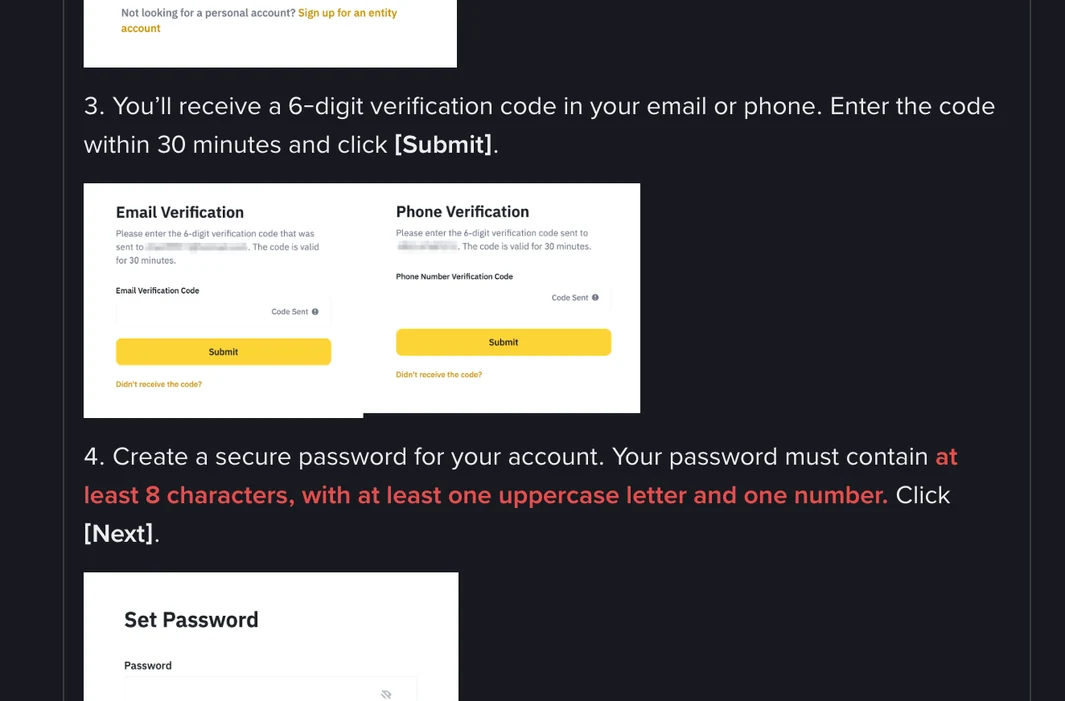
Under the Submit button there's a "Didn't receive the code?" link. If the code doesn't arrive, use that link first, then see the section on missing codes below.
Step 4: Create your password
Binance's minimum is at least 8 characters, with at least one uppercase letter and one number. Treat that as the floor. A longer password you haven't used anywhere else, saved in a password manager, protects the account far better than one that only just meets the rule. Click [Next].
Step 5: Check the Referral ID field before you continue
Next you see a screen titled "Set up your account", which confirms that your account has been created and shows a field labelled Referral ID (Optional).
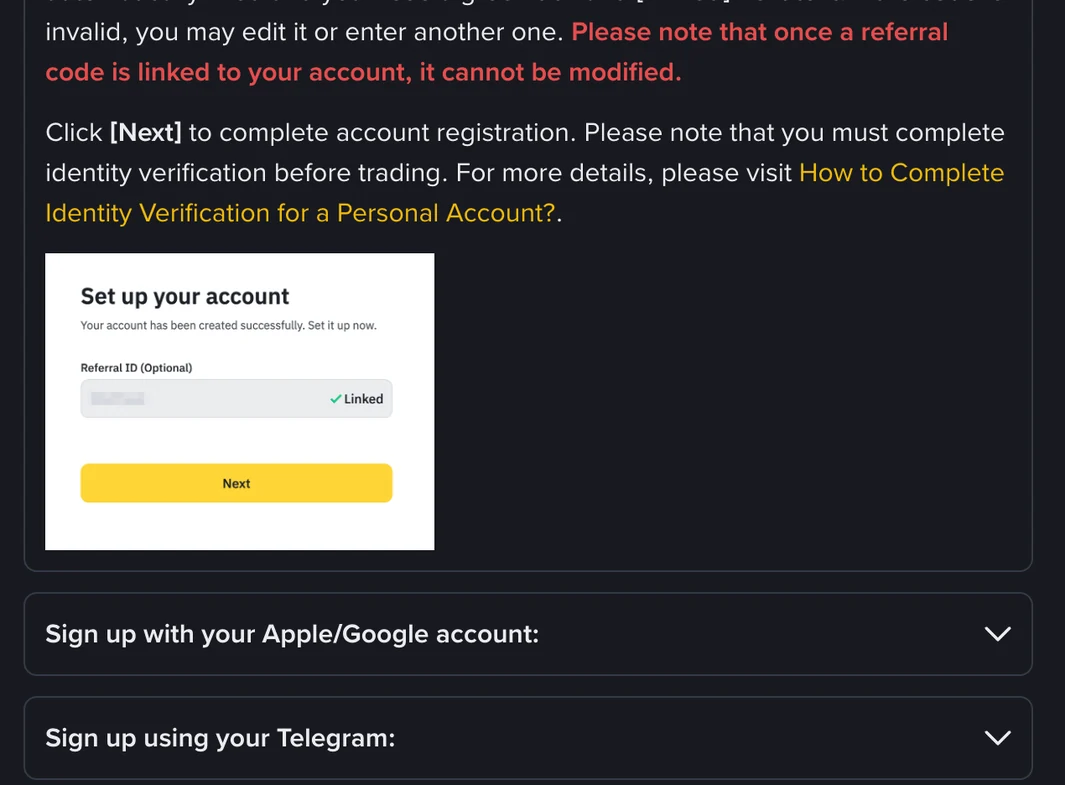
If you came through a referral link, the code should already be in the field with a green tick and [Linked] beside it. If the code is invalid, you can edit it or enter another one. If you didn't use a link and want to add a code, this is the place to type it (for example BTC6886) before you continue. Leave the field empty if you don't have one. Binance states that once a referral code is linked to your account, it cannot be modified.
Step 6: Click Next to finish
Click [Next] to complete registration. The account now exists, but Binance notes that you must complete identity verification before trading. That process is covered further down.
The Google, Apple and Telegram versions
With Google or Apple, select [Continue with Google] or [Continue with Apple] and sign in through the pop-up. Binance then asks you to read and agree to the Terms of Service and Privacy Policy and click [Confirm]. Back on the Binance site, confirm once more and click [Next]. The same Referral ID screen follows.
With Telegram, click [Continue with Telegram], then [Connect] in the pop-up, and log in to Telegram. Tap [Confirm] in the notification Telegram sends you. Choose [Create a new Binance Account]; the other option, [Link an existing Binance Account], is for people who already have one. Enter an email address or phone number, agree to the terms, click [Next], and enter the one-time code sent to you. The account is then created, and you can bind a referral code at that point if you have one.
Creating a Binance account in the mobile app
The app flow mirrors the website, with one difference at the end. Install the app from the download page linked on binance.com rather than from a link someone sends you, and run anything doubtful through Binance Verify first.
- Open the app and tap [Sign up]. The button is there in both Lite mode and Pro mode.
- Tap [Create a Binance Account].
- Choose email, phone number, Apple or Google. Telegram is available through [Continue with Telegram].
- Enter your email address or phone number, agree to the Terms of Service and Privacy Policy, tick the box and tap [Next].
- Enter the 6-digit code within 30 minutes and tap [Submit].
- Set a password with at least 8 characters, one uppercase letter and one number, then tap [Next].
- Check the referral field. A code from a referral link shows [Linked]. With no code, the Help Center says you can skip this step, and the Apple/Google flow shows a [Skip] button for it.
- Tap [Next].
That last tap takes you straight into identity verification. On the website you reach the same process from your account menu instead.
Binance verification code not arriving? What to try
For a text message, Binance's help page on SMS codes lists a short sequence: make sure your phone has a good signal, disable anti-virus, firewall or call-blocker apps that might block Binance's SMS number, restart the phone, try voice verification instead, or reset SMS authentication. The same page notes that Binance's SMS coverage doesn't include every country and region, and it keeps a global coverage list. If your area isn't covered, Binance suggests using passkeys, BAuthenticator or Google Authenticator as your main two-factor method once the account exists. And if texts simply won't arrive during sign-up, the form also accepts an email address.
For an email, the code screen has the "Didn't receive the code?" link mentioned in Step 3. Look in spam or filtered folders, and check that you typed the address correctly on the first screen.
Because each code is valid for 30 minutes, a code from an earlier attempt may already have expired.
Binance identity verification: documents, the face check and review time
Registration only creates the account. Binance's identity verification guide says all new users must complete the [Verified] level before they can use Binance products, including crypto deposits and trades. Your verification level also determines your trading limits.
To start on the website, hover over the profile icon, click [Account], go to [Identification] and click [Get Verified]. Banners on the homepage may also show [Verify] or [Get verified]. In the app, tap [Verify Now] on the homepage, or tap the account center icon and then [Unverified].
Choose your residence and document
The first screen, "Let's Get You Verified", asks for three things: Residence, Document Issuing Country/Region and Document Type.
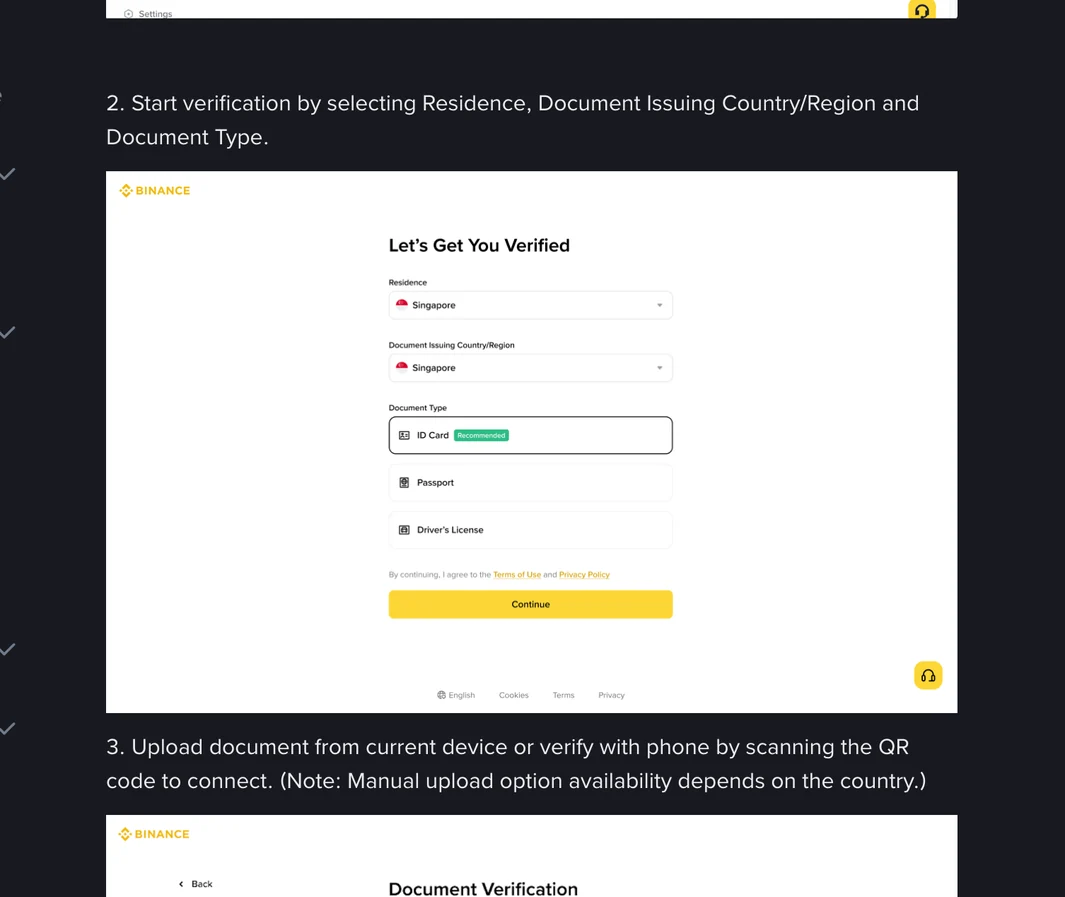
Binance says most users can verify with a passport, ID card or driver's license, but the options depend on your country. Residence is where you actually live, which may differ from the country that issued your document. Fill in both honestly.
Upload the document
You can upload from the device you're using or switch to your phone by scanning a QR code. Binance notes that a manual upload option depends on the country. For an ID card, upload the front and the back, then click [Continue] once both have gone through.
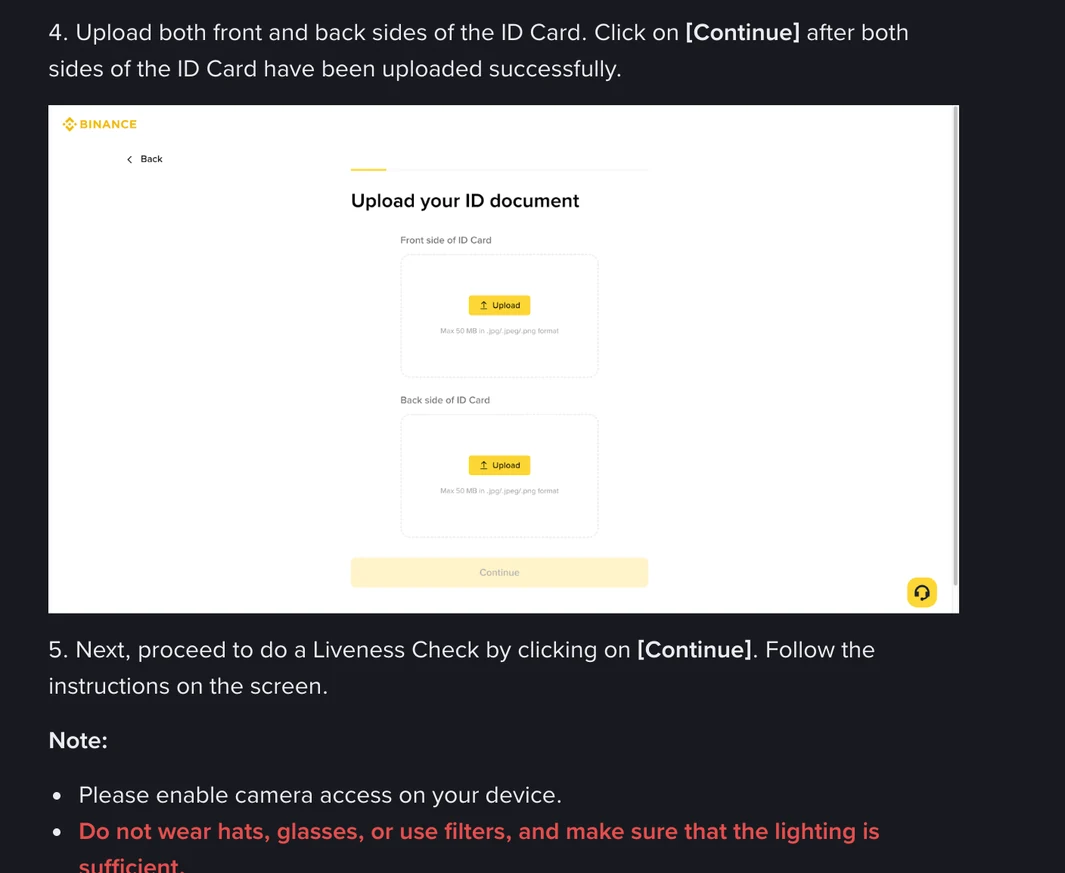
The illustration shows a 50 MB limit and JPG, JPEG or PNG files. If your screen shows different limits, go by your screen.
Pass the liveness check
Next comes a liveness check with your camera. Allow camera access, take off hats and glasses, turn off filters, and make sure the light is good. In the app, Binance asks you to keep your whole face visible and centered, with your eyes open.
Binance's face verification page adds practical detail. It suggests a plain background, a clean camera lens, holding the device steady at eye level, and being ready to turn your head slowly or blink when asked. It names poor lighting, low camera quality, glasses, hats or masks, and a big difference between your ID photo and your live face as reasons the check can fail. Using someone else's face or ID also causes a failure, and sharing an account with family members to get past the check breaks Binance's terms. Binance may ask for face verification again later, for example when you log in, trade or withdraw, and says it can't be removed or bypassed.
Confirm your details and wait for the review
Check the personal information shown and click [Continue]. It must match your ID document, and Binance says you won't be able to change it once confirmed. Don't refresh the browser or close the app while the process is running.
| Check | Review time stated by Binance |
|---|---|
| Identity documents | Usually within 48 hours; may take longer in some particular cases |
| Proof of address (if requested) | Up to 1–2 working days |
You'll get a notification once you're verified.
If you're asked for proof of address
Binance's proof of address guide describes it in two ways. One passage says new account holders will be asked to upload both proof of identity and proof of address. Another says Binance collects one or two documents. The page doesn't say when each applies, so follow the prompts on your own Identification page. If an address document is needed, the path is [Profile] → [Account] → [Identification] → [Get Verified Plus] on the website, or [Account Center] → [Profile] → [Verifications] → [Get Verified Plus] in the app.
The document has to be in your name and show your home address, its date of issue and who issued it, matching the name and address you entered. How recent it must be depends on where you live: six months in most countries unless the document states otherwise, three months in a long list of countries, and two months in India. The upload checklist on the same page puts it differently: "not older than three or 6 months depending on jurisdiction". Where the two differ, go by what the verification page asks of you. Utility bills and bank statements are on the accepted list. Payslips, streaming service bills, mobile phone bills on their own (with exceptions in some jurisdictions) and addresses at a P.O. box or virtual office are not. Photocopies aren't accepted; Binance prefers PDFs but takes clear colour scans or screenshots.
Three security settings to switch on after you sign up
Both of Binance's sign-up guides carry the same advice: Binance "highly recommend[s] enabling at least 1 two-factor authentication (2FA)". In the app, the Security screen repeats it under Two-Factor Authentication. These three settings are a good place to start.
1. Add a passkey
A passkey lets you confirm it's you with your device's biometrics, screen lock, a security key or another phone. Binance describes it as faster and more secure than relying on a password alone, and once it's added you can use it for two-factor authentication on all your linked devices.
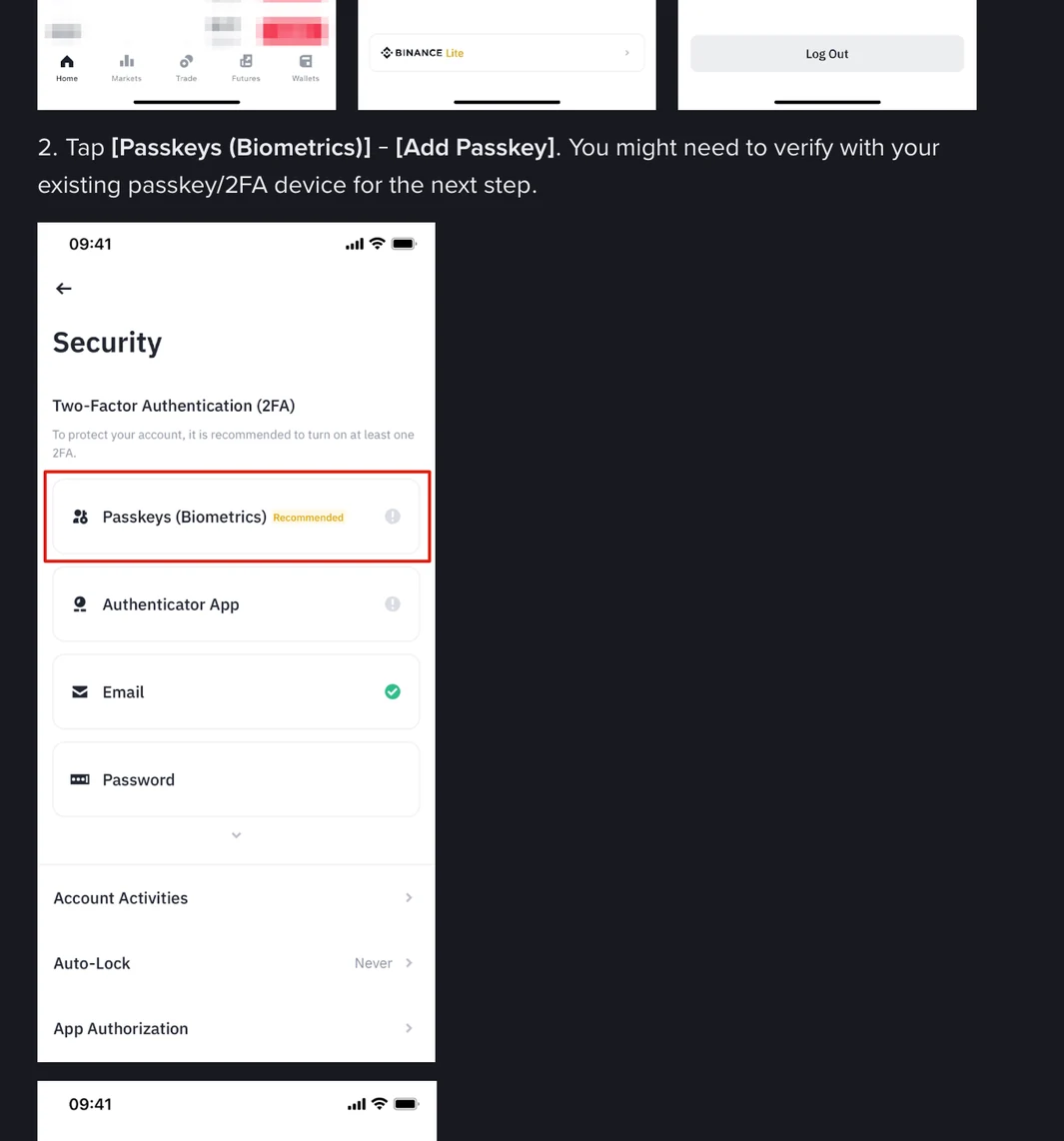
In the app, go to [Account Center], tap the profile section at the top, open [Security] and tap [Passkeys (Biometrics)] → [Add Passkey]. You may need to verify with an existing two-factor method first. According to Binance's passkey guide, this needs app version 2.60 or above on iOS 16 or above, or Android 9 or above. You can store the passkey in iCloud Keychain, on a USB or NFC security key, with your phone's screen lock or PIN, on another device, or in Google Password Manager on Android.
On the website, use a supported browser such as the latest Chrome. Go to [Account] → [Security], click [Manage] next to [Passkeys (Biometrics)] and then [Add Passkey]. A passkey saved to your Chrome profile stays on that one computer. Binance recommends Google Password Manager instead, because it syncs with your Google account.
2. Set an anti-phishing code
This is a short code you choose that Binance then includes in every genuine email and SMS it sends you. If a message claiming to be from Binance shows the wrong code or none at all, Binance says it may be a phishing attempt and should be reported.
On the website, go to [Account] → [Security], scroll to [Advanced Security] and click [Enable] next to Anti-Phishing Code, then [Create]. In the app it's under [Security] → [Anti-Phishing Code] → [Create]. The code must be 6 to 8 characters long and use at least three of these four types: uppercase letters, lowercase letters, digits and underscores. Special characters aren't allowed. Binance suggests picking something you'll recognise instantly but others won't guess. You confirm with your two-factor method or passkey to finish. Full steps are in Binance's anti-phishing code guide.
3. Later on: choose 2FA methods for each action
Binance also has a 2FA Verification Strategy page, found under [Account] → [Security] in the Advanced Security section on the website. There you choose which methods (passkeys, email, an authenticator app or your phone number) protect which actions: login, assets, account settings and security management. It only opens up once you meet two requirements: you need to have finished identity verification and to hold a minimum of 100 USDT in assets. Binance's page puts that as "at least 100 USDT" in one place and "more than 100 USDT" in another, so check what your screen asks for. Binance adds that extra verification beyond your chosen methods may still be required in some cases.
Keep using Binance Verify after you've signed up. Any email, phone number, Telegram account or social profile that contacts you in Binance's name can be checked there, and Binance states it will never ask for funds or tokens in a private message.
Binance sign-up questions
Can people in the United States sign up for Binance.com?
No. Binance's List of Prohibited Countries excludes anyone located in, resident of, a citizen of, or operating in the United States, so US citizens living abroad are covered too. Binance.US is a separate platform, and this guide doesn't cover it. See the eligibility section for the full list.
Do I have to verify my identity to use Binance?
Yes. Binance requires all new users to complete the Verified level to access its products, including crypto deposits and trades. You can create the account first and verify afterwards, but you can't trade until verification is done.
How long does Binance identity verification take?
Binance says submitted documents are usually reviewed within 48 hours, although some cases take longer. If you're also asked for proof of address, that review can take up to 1–2 working days. You'll get a notification when it's done.
How long is the Binance verification code valid?
The 6-digit code sent to your email or phone during sign-up is valid for 30 minutes. If it expires or doesn't arrive, use the "Didn't receive the code?" link on the code screen. A code from an earlier attempt may already have expired.
What are Binance's password requirements?
At least 8 characters, including at least one uppercase letter and one number. That's the minimum Binance accepts; a longer password that you don't use anywhere else is safer.
I forgot to add a referral code. Can I add it after signing up?
Sometimes. Binance allows a referral code to be bound after registration only under several conditions, and the key ones are that the account is within 30 days of registration and has no deposit or trading activity. Once a referral code is linked to an account, it can't be changed. If you want to use one, such as BTC6886, enter it in the Referral ID field during sign-up.
Can I open a second Binance account?
Binance's Terms let it restrict or close accounts if you open multiple accounts without its written consent. If you already have a verified personal account, Binance's own suggestion is to create a separate entity account or use sub-accounts, of which you can create up to 5 under a personal account.
Can I switch from a personal account to an entity account later?
No. Binance states that once you register, you cannot change the account type. Companies should start from the entity sign-up option instead of the personal one.